Граф — це математична структура, що складається з множини вершин (вузлів) та множини ребер (зв'язків), які з'єднують пари вершин. Графи застосовуються для моделювання зв'язків у різних системах: соціальних мережах, транспортних маршрутах, комп'ютерних мережах, базах даних тощо.
На рисунку нижче зображено приклад неорієнтованого графа.
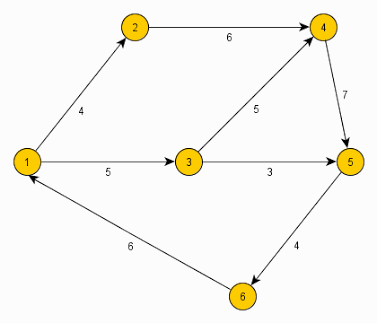
Граф називається зваженим, якщо кожному ребру відповідає певне число (вага). Наприклад, у транспортній мережі вага може означати відстань або час.
Існує кілька основних способів представлення графа в пам'яті комп'ютера:
Розглянемо граф, зображений на рисунку:
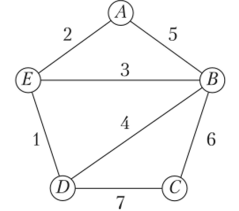
Матриця суміжності для цього графа:
| A | B | C | D | E | |
|---|---|---|---|---|---|
| A | 0 | 1 | 0 | 0 | 1 |
| B | 1 | 0 | 1 | 1 | 1 |
| C | 0 | 1 | 0 | 1 | 0 |
| D | 0 | 1 | 1 | 0 | 1 |
| E | 1 | 1 | 0 | 1 | 0 |
Матриця суміжності неорієнтованого графа завжди симетрична відносно головної діагоналі.
У 1736 році Леонард Ейлер розв'язав задачу про кенігсберзькі мости, що поклало початок теорії графів.
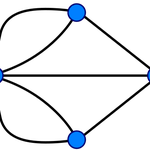
Задача про сім мостів Кенігсберга: чи можна пройти по всіх семи мостах, не проходячи жодного двічі? Ейлер довів, що це неможливо, оскільки відповідний граф має чотири вершини непарного степеня.
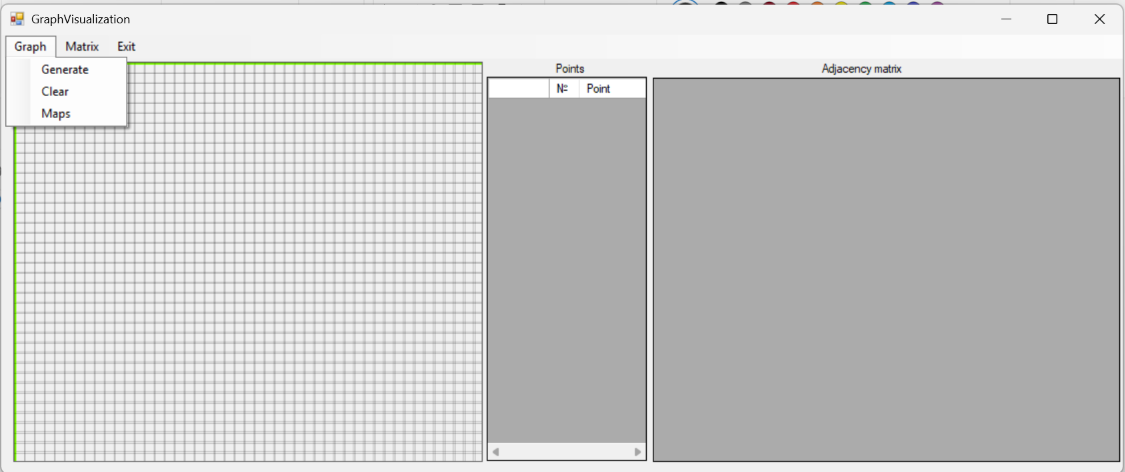
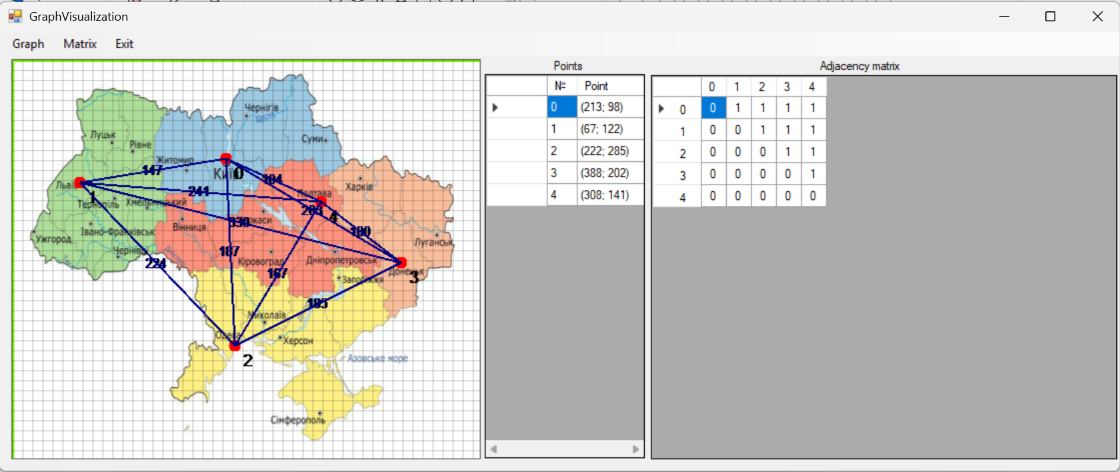
У цьому проєкті ми створимо програму на C# (Windows Forms), яка дозволяє:
Для роботи використовується компонент PictureBox для малювання, DataGridView для відображення списку вершин і матриці суміжності.
Додайте на форму:
PictureBox (назва pictureBox1) — для малювання графа.DataGridView для списку вершин (dataGridView1).DataGridView для матриці суміжності (dgw).MenuStrip знаходиться на панелі елементів у групі Меню. Елемент призначений для формування головного меню.MenuStrip (назва menuStrip1)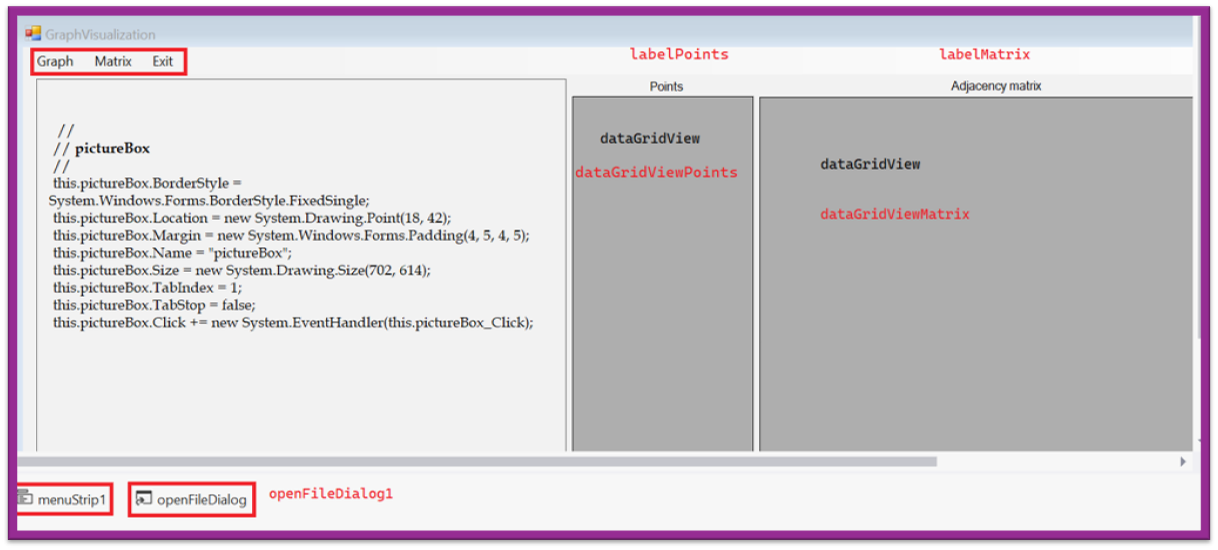
namespace GraphVisualization
{
    partial class Form1
    {
        ///
        /// Required designer variable.
        ///
        private System.ComponentModel.IContainer components = null;

        ///
        /// Clean up any resources being used.
        ///
        /// true if managed resources should be disposed; otherwise, false.
        protected override void Dispose(bool disposing)
        {
            if (disposing && (components != null))
            {
                components.Dispose();
            }
            base.Dispose(disposing);
        }

        #region Windows Form Designer generated code

        ///
        /// Required method for Designer support - do not modify
        /// the contents of this method with the code editor.
        ///
        private void InitializeComponent()
        {
            this.menuStrip1 = new System.Windows.Forms.MenuStrip();
            this.graphToolStripMenuItem = new System.Windows.Forms.ToolStripMenuItem();
            this.newGraphToolStripMenuItem = new System.Windows.Forms.ToolStripMenuItem();
            this.clearToolStripMenuItem = new System.Windows.Forms.ToolStripMenuItem();
            this.mapsToolStripMenuItem = new System.Windows.Forms.ToolStripMenuItem();
            this.matrixToolStripMenuItem = new System.Windows.Forms.ToolStripMenuItem();
            this.generateMatrixToolStripMenuItem = new System.Windows.Forms.ToolStripMenuItem();
            this.toSpanningToolStripMenuItem = new System.Windows.Forms.ToolStripMenuItem();
            this.exitToolStripMenuItem = new System.Windows.Forms.ToolStripMenuItem();
            this.pictureBox = new System.Windows.Forms.PictureBox();
            this.dataGridViewPoints = new System.Windows.Forms.DataGridView();
            this.dataGridViewMatrix = new System.Windows.Forms.DataGridView();
            this.labelPoints = new System.Windows.Forms.Label();
            this.labelMatrix = new System.Windows.Forms.Label();
            this.openFileDialog = new System.Windows.Forms.OpenFileDialog();
            this.menuStrip1.SuspendLayout();
            ((System.ComponentModel.ISupportInitialize)(this.pictureBox)).BeginInit();
            ((System.ComponentModel.ISupportInitialize)(this.dataGridViewPoints)).BeginInit();
            ((System.ComponentModel.ISupportInitialize)(this.dataGridViewMatrix)).BeginInit();
            this.SuspendLayout();
            //
            // menuStrip1
            //
            this.menuStrip1.GripMargin = new System.Windows.Forms.Padding(2, 2, 0, 2);
            this.menuStrip1.ImageScalingSize = new System.Drawing.Size(24, 24);
            this.menuStrip1.Items.AddRange(new System.Windows.Forms.ToolStripItem[] {
            this.graphToolStripMenuItem,
            this.matrixToolStripMenuItem,
            this.exitToolStripMenuItem});
            this.menuStrip1.Location = new System.Drawing.Point(0, 0);
            this.menuStrip1.Name = "menuStrip1";
            this.menuStrip1.Size = new System.Drawing.Size(1924, 36);
            this.menuStrip1.TabIndex = 0;
            this.menuStrip1.Text = "menuStrip1";
            //
            // graphToolStripMenuItem
            //
            this.graphToolStripMenuItem.DropDownItems.AddRange(new System.Windows.Forms.ToolStripItem[] {
            this.newGraphToolStripMenuItem,
            this.clearToolStripMenuItem,
            this.mapsToolStripMenuItem});
            this.graphToolStripMenuItem.Name = "graphToolStripMenuItem";
            this.graphToolStripMenuItem.Size = new System.Drawing.Size(76, 32);
            this.graphToolStripMenuItem.Text = "Graph";
            //
            // newGraphToolStripMenuItem
            //
            this.newGraphToolStripMenuItem.Name = "newGraphToolStripMenuItem";
            this.newGraphToolStripMenuItem.Size = new System.Drawing.Size(184, 34);
            this.newGraphToolStripMenuItem.Text = "Generate";
            this.newGraphToolStripMenuItem.Click += new System.EventHandler(this.newGraphToolStripMenuItem_Click);
            //
            // clearToolStripMenuItem
            //
            this.clearToolStripMenuItem.Name = "clearToolStripMenuItem";
            this.clearToolStripMenuItem.Size = new System.Drawing.Size(184, 34);
            this.clearToolStripMenuItem.Text = "Clear";
            this.clearToolStripMenuItem.Click += new System.EventHandler(this.clearToolStripMenuItem_Click);
            //
            // mapsToolStripMenuItem
            //
            this.mapsToolStripMenuItem.Name = "mapsToolStripMenuItem";
            this.mapsToolStripMenuItem.Size = new System.Drawing.Size(184, 34);
            this.mapsToolStripMenuItem.Text = "Maps";
            this.mapsToolStripMenuItem.Click += new System.EventHandler(this.mapsToolStripMenuItem_Click);
            //
            // matrixToolStripMenuItem
            //
            this.matrixToolStripMenuItem.DropDownItems.AddRange(new System.Windows.Forms.ToolStripItem[] {
            this.generateMatrixToolStripMenuItem,
            this.toSpanningToolStripMenuItem});
            this.matrixToolStripMenuItem.Name = "matrixToolStripMenuItem";
            this.matrixToolStripMenuItem.Size = new System.Drawing.Size(77, 32);
            this.matrixToolStripMenuItem.Text = "Matrix";
            //
            // generateMatrixToolStripMenuItem
            //
            this.generateMatrixToolStripMenuItem.Name = "generateMatrixToolStripMenuItem";
            this.generateMatrixToolStripMenuItem.Size = new System.Drawing.Size(184, 34);
            this.generateMatrixToolStripMenuItem.Text = "Generate";
            this.generateMatrixToolStripMenuItem.Click += new System.EventHandler(this.generateMatrixToolStripMenuItem_Click);
            //
            // toSpanningToolStripMenuItem
            //
            this.toSpanningToolStripMenuItem.Name = "toSpanningToolStripMenuItem";
            this.toSpanningToolStripMenuItem.Size = new System.Drawing.Size(184, 34);
            //
            // exitToolStripMenuItem
            //
            this.exitToolStripMenuItem.Name = "exitToolStripMenuItem";
            this.exitToolStripMenuItem.Size = new System.Drawing.Size(55, 32);
            this.exitToolStripMenuItem.Text = "Exit";
            this.exitToolStripMenuItem.Click += new System.EventHandler(this.exitToolStripMenuItem_Click);
            //
            // pictureBox
            //
            this.pictureBox.BorderStyle = System.Windows.Forms.BorderStyle.FixedSingle;
            this.pictureBox.Location = new System.Drawing.Point(18, 42);
            this.pictureBox.Margin = new System.Windows.Forms.Padding(4, 5, 4, 5);
            this.pictureBox.Name = "pictureBox";
            this.pictureBox.Size = new System.Drawing.Size(702, 614);
            this.pictureBox.TabIndex = 1;
            this.pictureBox.TabStop = false;
            this.pictureBox.Click += new System.EventHandler(this.pictureBox_Click);
            //
            // dataGridViewPoints
            //
            this.dataGridViewPoints.AllowUserToAddRows = false;
            this.dataGridViewPoints.AllowUserToDeleteRows = false;
            this.dataGridViewPoints.AllowUserToResizeColumns = false;
            this.dataGridViewPoints.AllowUserToResizeRows = false;
            this.dataGridViewPoints.ColumnHeadersHeightSizeMode = System.Windows.Forms.DataGridViewColumnHeadersHeightSizeMode.AutoSize;
            this.dataGridViewPoints.Enabled = false;
            this.dataGridViewPoints.Location = new System.Drawing.Point(728, 65);
            this.dataGridViewPoints.Margin = new System.Windows.Forms.Padding(4, 5, 4, 5);
            this.dataGridViewPoints.Name = "dataGridViewPoints";
            this.dataGridViewPoints.RowHeadersWidth = 62;
            this.dataGridViewPoints.Size = new System.Drawing.Size(240, 591);
            this.dataGridViewPoints.TabIndex = 2;
            //
            // dataGridViewMatrix
            //
            this.dataGridViewMatrix.AllowUserToAddRows = false;
            this.dataGridViewMatrix.AllowUserToDeleteRows = false;
            this.dataGridViewMatrix.AllowUserToResizeColumns = false;
            this.dataGridViewMatrix.AllowUserToResizeRows = false;
            this.dataGridViewMatrix.ColumnHeadersHeightSizeMode = System.Windows.Forms.DataGridViewColumnHeadersHeightSizeMode.AutoSize;
            this.dataGridViewMatrix.Location = new System.Drawing.Point(976, 66);
            this.dataGridViewMatrix.Margin = new System.Windows.Forms.Padding(4, 5, 4, 5);
            this.dataGridViewMatrix.Name = "dataGridViewMatrix";
            this.dataGridViewMatrix.RowHeadersWidth = 62;
            this.dataGridViewMatrix.Size = new System.Drawing.Size(700, 591);
            this.dataGridViewMatrix.TabIndex = 3;
            //
            // labelPoints
            //
            this.labelPoints.AutoSize = true;
            this.labelPoints.Location = new System.Drawing.Point(827, 42);
            this.labelPoints.Margin = new System.Windows.Forms.Padding(4, 0, 4, 0);
            this.labelPoints.Name = "labelPoints";
            this.labelPoints.Size = new System.Drawing.Size(53, 20);
            this.labelPoints.TabIndex = 4;
            this.labelPoints.Text = "Points";
            //
            // labelMatrix
            //
            this.labelMatrix.AutoSize = true;
            this.labelMatrix.Location = new System.Drawing.Point(1226, 41);
            this.labelMatrix.Margin = new System.Windows.Forms.Padding(4, 0, 4, 0);
            this.labelMatrix.Name = "labelMatrix";
            this.labelMatrix.Size = new System.Drawing.Size(128, 20);
            this.labelMatrix.TabIndex = 5;
            this.labelMatrix.Text = "Adjacency matrix";
            //
            // openFileDialog
            //
            this.openFileDialog.FileName = "openFileDialog1";
            //
            // Form1
            //
            this.AutoScaleDimensions = new System.Drawing.SizeF(9F, 20F);
            this.AutoScaleMode = System.Windows.Forms.AutoScaleMode.Font;
            this.AutoScroll = true;
            this.AutoSize = true;
            this.ClientSize = new System.Drawing.Size(1924, 675);
            this.Controls.Add(this.labelMatrix);
            this.Controls.Add(this.labelPoints);
            this.Controls.Add(this.dataGridViewMatrix);
            this.Controls.Add(this.dataGridViewPoints);
            this.Controls.Add(this.pictureBox);
            this.Controls.Add(this.menuStrip1);
            this.FormBorderStyle = System.Windows.Forms.FormBorderStyle.FixedSingle;
            this.MainMenuStrip = this.menuStrip1;
            this.Margin = new System.Windows.Forms.Padding(4, 5, 4, 5);
            this.Name = "Form1";
            this.Text = "GraphVisualization";
            this.menuStrip1.ResumeLayout(false);
            this.menuStrip1.PerformLayout();
            ((System.ComponentModel.ISupportInitialize)(this.pictureBox)).EndInit();
            ((System.ComponentModel.ISupportInitialize)(this.dataGridViewPoints)).EndInit();
            ((System.ComponentModel.ISupportInitialize)(this.dataGridViewMatrix)).EndInit();
            this.ResumeLayout(false);
            this.PerformLayout();

        }

        #endregion

        private System.Windows.Forms.MenuStrip menuStrip1;
        private System.Windows.Forms.ToolStripMenuItem graphToolStripMenuItem;
        private System.Windows.Forms.ToolStripMenuItem newGraphToolStripMenuItem;
        private System.Windows.Forms.ToolStripMenuItem clearToolStripMenuItem;
        private System.Windows.Forms.PictureBox pictureBox;
        private System.Windows.Forms.DataGridView dataGridViewPoints;
        private System.Windows.Forms.DataGridView dataGridViewMatrix;
        private System.Windows.Forms.Label labelPoints;
        private System.Windows.Forms.Label labelMatrix;
        private System.Windows.Forms.ToolStripMenuItem matrixToolStripMenuItem;
        private System.Windows.Forms.ToolStripMenuItem generateMatrixToolStripMenuItem;
        private System.Windows.Forms.ToolStripMenuItem toSpanningToolStripMenuItem;
        private System.Windows.Forms.ToolStripMenuItem exitToolStripMenuItem;
        private System.Windows.Forms.ToolStripMenuItem mapsToolStripMenuItem;
        private System.Windows.Forms.OpenFileDialog openFileDialog;
    }
}
using System;
using System.Collections.Generic;
using System.ComponentModel;
using System.Drawing;
using System.IO;
using System.Linq;
using System.Windows.Forms;

namespace GraphVisualization
{
    // Структура, що представляє ребро графа: дві вершини та вагу (довжину)
    struct Edge
    {
        public MyPoint Point1;   // Перша вершина ребра
        public MyPoint Point2;   // Друга вершина ребра
        public int Weight;       // Вага ребра (відстань між вершинами)

        // Конструктор для створення ребра
        public Edge(MyPoint point1, MyPoint point2, int weight)
        {
            Point1 = point1;
            Point2 = point2;
            Weight = weight;
        }
    }

    // Структура, що представляє вершину графа: ідентифікатор та координати
    struct MyPoint
    {
        public int Id;   // Унікальний номер вершини
        public int X;    // Координата X на площині
        public int Y;    // Координата Y на площині

        // Конструктор для створення вершини
        public MyPoint(int id, int x, int y)
        {
            Id = id;
            X = x;
            Y = y;
        }
    }

    public partial class Form1 : Form
    {
        // Діалогове вікно для вибору файлу зображення
        OpenFileDialog _open_file = new OpenFileDialog();

        // Бітова карта для малювання графа (буфер)
        private Bitmap bitmap;

        // Список усіх вершин графа
        private List points = new List();

        // Список усіх ребер графа
        private List edges = new List();

        // Графічний контекст для малювання на bitmap
        private Graphics graphics;

        // Константи для налаштування зовнішнього вигляду
        private const int Radius = 6;                // Радіус кола вершини
        private const int EdgeThickness = 2;         // Товщина ліній ребер
        private const int PointLabelFontSize = 12;   // Розмір шрифту підпису вершини
        private const int EdgeLabelFontSize = 10;    // Розмір шрифту підпису ребра (ваги)
        private const string FontName = "Arial";     // Назва шрифту

        // Конструктор форми
        public Form1()
        {
            InitializeComponent();

            // Ініціалізація бітової карти розміром з PictureBox
            bitmap = new Bitmap(pictureBox.Width, pictureBox.Height);
            // Створення графічного контексту для малювання на bitmap
            graphics = Graphics.FromImage(bitmap);

            // Налаштування DataGridView для відображення списку вершин
            dataGridViewPoints.Columns.Add("pointNumber", "№");           // Колонка з номером
            dataGridViewPoints.Columns.Add("pointСoordinates", "Point");  // Колонка з координатами
            dataGridViewPoints.Columns[0].Width = 30;   // Ширина колонки номера
            dataGridViewPoints.Columns[1].Width = 70;   // Ширина колонки координат

            // Налаштування DataGridView для матриці суміжності
            dataGridViewMatrix.RowHeadersWidth = 50;    // Ширина заголовків рядків
        }

        // Метод для відкриття діалогового вікна вибору зображення
        private string OpenImageFile()
        {
            string path = "";

            // Налаштування діалогового вікна
            _open_file.InitialDirectory = Directory.GetCurrentDirectory();
            _open_file.Filter = "Image Files(*.JPG;*.GIF;*.PNG)|*.JPG;*.GIF;*.PNG|All files (*.*)|*.*";
            _open_file.FilterIndex = 2;
            _open_file.RestoreDirectory = true;

            // Якщо користувач обрав файл, зберігаємо шлях
            if (_open_file.ShowDialog() == DialogResult.OK)
            {
                path = _open_file.FileName;
            }
            return path;
        }

        // Обчислення відстані між двома точками (теорема Піфагора)
        private int EdgeLength(MyPoint point1, MyPoint point2)
        {
            return (int) Math.Sqrt(Math.Pow(point1.X - point2.X, 2) + Math.Pow(point1.Y - point2.Y, 2));
        }

        // Малювання однієї вершини (коло та підпис)
        private void DrawPoint(MyPoint point, string text)
        {
            // Малюємо зафарбоване коло червоного кольору
            graphics.FillEllipse(new SolidBrush(Color.Red),
                point.X - Radius, point.Y - Radius, Radius * 2, Radius * 2);

            // Малюємо текст (номер вершини) біля кола
            graphics.DrawString(text, new Font(FontName, PointLabelFontSize),
                new SolidBrush(Color.Black), point.X + Radius, point.Y + Radius);

            // Оновлюємо зображення в PictureBox
            pictureBox.Image = bitmap;
        }

        // Заповнення матриці суміжності значеннями (для демонстрації)
        private void FillMatrix(int number)
        {
            for (int i = 0; i < points.Count; i++)
            {
                for (int j = 0; j < points.Count; j++)
                {
                    // Заповнюємо верхню трикутну матрицю числом, нижню - нулями
                    dataGridViewMatrix.Rows[i].Cells[j].Value = (i < j) ? number : 0;
                }
            }
        }

        // Генерація порожньої матриці суміжності відповідного розміру
        private void GenerateMatrix()
        {
            ClearMatrix(); // Спочатку очищаємо матрицю

            // Додаємо стовпці для кожної вершини
            foreach (var point in points)
            {
                DataGridViewColumn column = new DataGridViewTextBoxColumn();
                column.Name = $"{point.Id}";
                column.Width = 25;
                dataGridViewMatrix.Columns.Add(column);
            }

            // Додаємо рядки та встановлюємо заголовки
            foreach (var point in points)
            {
                dataGridViewMatrix.Rows.Add();
                dataGridViewMatrix.Rows[dataGridViewMatrix.Rows.Count - 1].HeaderCell.Value = $"{point.Id}";
            }

            // Заповнюємо матрицю одиницями у верхній трикутній частині
            FillMatrix(1);

            // Центруємо текст у комірках
            foreach (DataGridViewColumn column in dataGridViewMatrix.Columns)
            {
                column.DefaultCellStyle.Alignment = DataGridViewContentAlignment.MiddleCenter;
            }
        }

        // Генерація списку ребер на основі матриці суміжності
        private void GenerateEdges()
        {
            edges.Clear(); // Очищаємо попередній список ребер

            for (int i = 0; i < points.Count; i++)
            {
                for (int j = 0; j < points.Count; j++)
                {
                    // Якщо в матриці стоїть 1 і це не петля (i != j)
                    if (i != j && Convert.ToInt32(dataGridViewMatrix.Rows[i].Cells[j].Value) == 1)
                    {
                        // Створюємо копії точок, щоб уникнути зміни оригіналів
                        MyPoint p1 = new MyPoint(points[i].Id, points[i].X, points[i].Y);
                        MyPoint p2 = new MyPoint(points[j].Id, points[j].X, points[j].Y);
                        // Додаємо ребро з вагою (відстанню)
                        edges.Add(new Edge(p1, p2, EdgeLength(p1, p2)));
                    }
                }
            }
        }

        // Малювання всіх вершин
        private void DrawPoints()
        {
            for (int i = 0; i < points.Count; i++)
            {
                DrawPoint(points[i], $"{i}"); // Малюємо кожну вершину з номером
            }
        }

        // Малювання всіх ребер разом з підписами (вагами)
        private void DrawEdges()
        {
            foreach (var edge in edges)
            {
                MyPoint p1 = edge.Point1;
                MyPoint p2 = edge.Point2;

                // Обчислюємо текст підпису (вага ребра)
                var label = EdgeLength(p1, p2).ToString();
                var font = new Font(FontName, EdgeLabelFontSize);
                // Визначаємо розмір тексту для центрування
                var size = graphics.MeasureString(label, font, pictureBox.Size);

                // Малюємо лінію ребра темно-синім кольором
                graphics.DrawLine(new Pen(Color.Navy, EdgeThickness),
                    new Point(p1.X, p1.Y), new Point(p2.X, p2.Y));

                // Малюємо текст ваги посередині ребра
                graphics.DrawString(label, font, new SolidBrush(Color.Navy),
                    (p1.X + p2.X) / 2 - size.Width / 2,
                    (p1.Y + p2.Y) / 2 - size.Height / 2);
            }
        }

        // Очищення графа: видалення всіх вершин і ребер, очищення таблиці
        private void ClearGraph()
        {
            graphics.Clear(Color.Transparent); // Очищаємо графічний контекст
            this.pictureBox.BackgroundImage = bitmap; // Встановлюємо очищений bitmap як фон
            this.pictureBox.BackgroundImageLayout = System.Windows.Forms.ImageLayout.Stretch;
            points.Clear(); // Очищаємо список вершин
            Setka();        // Перемальовуємо сітку
            dataGridViewPoints.Rows.Clear(); // Очищаємо таблицю вершин
        }

        // Очищення матриці суміжності
        private void ClearMatrix()
        {
            dataGridViewMatrix.Rows.Clear();
            dataGridViewMatrix.Columns.Clear();
        }

        // Обробник кліку по PictureBox: додавання нової вершини
        private void pictureBox_Click(object sender, EventArgs e)
        {
            // Обчислюємо координати кліку з урахуванням положення PictureBox на формі
            int x = MousePosition.X - Location.X - pictureBox.Location.X - 8;
            int y = MousePosition.Y - Location.Y - pictureBox.Location.Y - 32;

            // Додаємо нову вершину з автоматичним номером
            points.Add(new MyPoint(points.Count, x, y));

            // Додаємо запис у таблицю вершин
            dataGridViewPoints.Rows.Add(points[points.Count - 1].Id, $"({x}; {y})");

            // Малюємо щойно додану вершину
            DrawPoint(points[points.Count - 1], $"{points.Count - 1}");
        }

        // Обробник пункту меню "Новий граф" (побудова графа)
        private void newGraphToolStripMenuItem_Click(object sender, EventArgs e)
        {
            // Якщо матриця ще не створена або її розмір не відповідає кількості вершин
            if (dataGridViewMatrix.Rows.Count < dataGridViewPoints.Rows.Count)
                GenerateMatrix(); // Генеруємо матрицю суміжності

            GenerateEdges();  // Формуємо ребра на основі матриці
            DrawPoints();     // Малюємо вершини
            DrawEdges();      // Малюємо ребра

            this.pictureBox.Invalidate(); // Примусово перемальовуємо PictureBox
        }

        // Обробник пункту меню "Очистити" (повне очищення)
        private void clearToolStripMenuItem_Click(object sender, EventArgs e)
        {
            ClearGraph();   // Очищаємо граф
            ClearMatrix();  // Очищаємо матрицю
        }

        // Обробник пункту меню "Згенерувати матрицю"
        private void generateMatrixToolStripMenuItem_Click(object sender, EventArgs e)
        {
            GenerateMatrix(); // Створюємо порожню матрицю суміжності
        }

        // Малювання координатної сітки на графічному контексті
        protected void Setka()
        {
            Pen pen = new Pen(Color.Chartreuse, EdgeThickness);
            graphics.Clear(Color.Transparent); // Очищаємо попереднє зображення

            // Малюємо межі області (рамку)
            Point P0 = new Point(1, 500); Point P1 = new Point(500, 500);
            Point P2 = new Point(1, 1); Point P3 = new Point(500, 1);
            graphics.DrawLine(pen, P0, P1); graphics.DrawLine(pen, P2, P3);
            graphics.DrawLine(pen, P0, P2); graphics.DrawLine(pen, P3, P1);

            // Налаштовуємо тонку сіру сітку з кроком 10 пікселів
            pen.Width = 1;
            pen.Color = Color.FromArgb(50, 0, 0, 0);
            for (int i = 0; i < 501; i = i + 10)
            {
                graphics.DrawLine(pen, i, 0, i, 500);   // Вертикальні лінії
                graphics.DrawLine(pen, 0, i, 500, i);   // Горизонтальні лінії
            }

            // Оновлюємо зображення
            pictureBox.Image = bitmap;
        }

        // Перевизначений метод OnPaint: викликається при необхідності перемалювання форми
        protected override void OnPaint(PaintEventArgs e)
        {
            Setka(); // Малюємо сітку

            // Встановлюємо bitmap як фон PictureBox
            this.pictureBox.BackgroundImage = bitmap;
            this.pictureBox.BackgroundImageLayout = System.Windows.Forms.ImageLayout.Stretch;

            DrawPoints(); // Малюємо вершини
            DrawEdges();  // Малюємо ребра

            base.OnPaint(e);
        }

        // Обробник пункту меню "Вихід"
        private void exitToolStripMenuItem_Click(object sender, EventArgs e)
        {
            Application.Exit(); // Завершуємо роботу програми
        }

        // Обробник пункту меню "Карта" (завантаження фонового зображення)
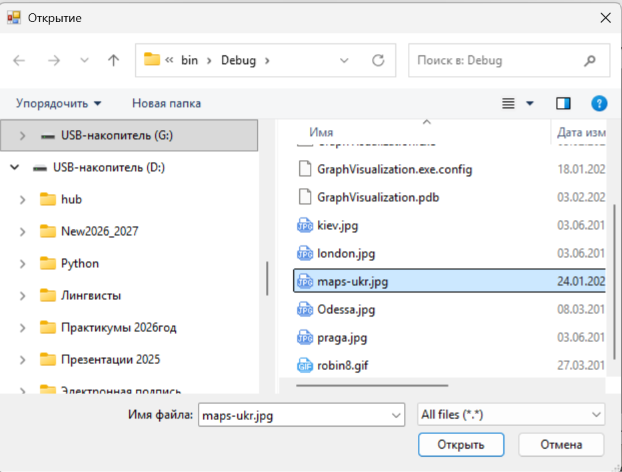
        private void mapsToolStripMenuItem_Click(object sender, EventArgs e)
        {
            string path_image = OpenImageFile(); // Відкриваємо діалог вибору файлу
            if (string.IsNullOrEmpty(path_image)) { return; } // Якщо файл не обрано, виходимо

            Bitmap bitmap = new Bitmap(path_image); // Завантажуємо зображення
            this.pictureBox.BackgroundImage = bitmap; // Встановлюємо як фон
            this.pictureBox.BackgroundImageLayout = System.Windows.Forms.ImageLayout.Stretch;
            Setka(); // Малюємо сітку поверх фону
        }
    }
}
using System;
using System.Windows.Forms;

namespace GraphVisualization
{
    static class Program
    {
        ///
        /// The main entry point for the application.
        ///
        [STAThread]
        static void Main()
        {
            Application.EnableVisualStyles();
            Application.SetCompatibleTextRenderingDefault(false);
            Application.Run(new Form1());
        }
    }
}
Ми розглянули основи теорії графів, способи їх представлення та створили простий застосунок для візуалізації неорієнтованого графа на основі матриці суміжності. Цей проєкт є основою для подальшого розвитку: додавання орієнтованих ребер, ваг, алгоритмів пошуку шляхів тощо.